LoopBoard
Home→ Features→ About→ Extension→ Discord↗
TermsPrivacyCopyrightLicenses
NOW 1.0 — FREE FOR WINDOWS

The moodboard built for motion.

Collect clips from anywhere, cut them down to the moment that matters, and keep them playing beside your work.


Get it from Microsoft Store See it in action
On your phone?
LoopBoard tool rail: select, pan, pen, text, rectangle, ellipse, line, arrow, link, download, clip capture, screenshot, help, settings
Link card: Fondos gif | Animacion gif — in.pinterest.com
opening beat — hold longer
keep this pace
loop point?
night palette
just for artstyle
reference
drop in here
BG
Peak song
0:00 / 1:55

Everywhere else, a video turns into a still frame.

In LoopBoard, every clip keeps running.

* Clips shown are for demo purposes only. We don't own them; all credit goes to their original creators. Want yours featured or removed? contact us.

PLATFORM
Windows 10 / 11
YOUR BOARDS
Stay on your machine
ON CANVAS
200+ clips, still smooth
HANDOFF
One .loopboard file
THE PROBLEM

You think in motion. Your moodboard doesn't.

Most reference tools were built for images. Paste in a video and it turns into a thumbnail, a still frame standing in for the one thing that was supposed to move. So you scrub back to the right second, lose it, and scrub again.

THUMBNAIL.JPG
EVERYWHERE ELSE — A STILL FRAME

LoopBoard keeps the clip itself on your canvas, playing, right where you left it.

01 / COLLECT

Get any reference onto your board.

Drop it in.

Video, images, audio, whole folders, or a frame pasted from your browser. It lands under your cursor and starts playing. No import dialog. Other files, like a PSD or PDF, open in their own app.

Save it from a link.

Paste a link and the video is saved to your board, so it keeps playing, even offline.

LoopBoard’s floating screen-recording control bar

Record your screen.

Capture your screen or a region, with system audio and your mic, from a small floating control bar. Hit stop and the clip is already on your board.

02 / REFINE

Keep only the part that matters.

Trim and crop on the board.

Cut an eight-second clip down to the one second you need, with a live preview and no editor to open.

Sketch on top.

Circle a detail, draw an arrow, mark the timing. Pen and shapes, right on your references.

03 / WORK

Keep your references in view while you work.

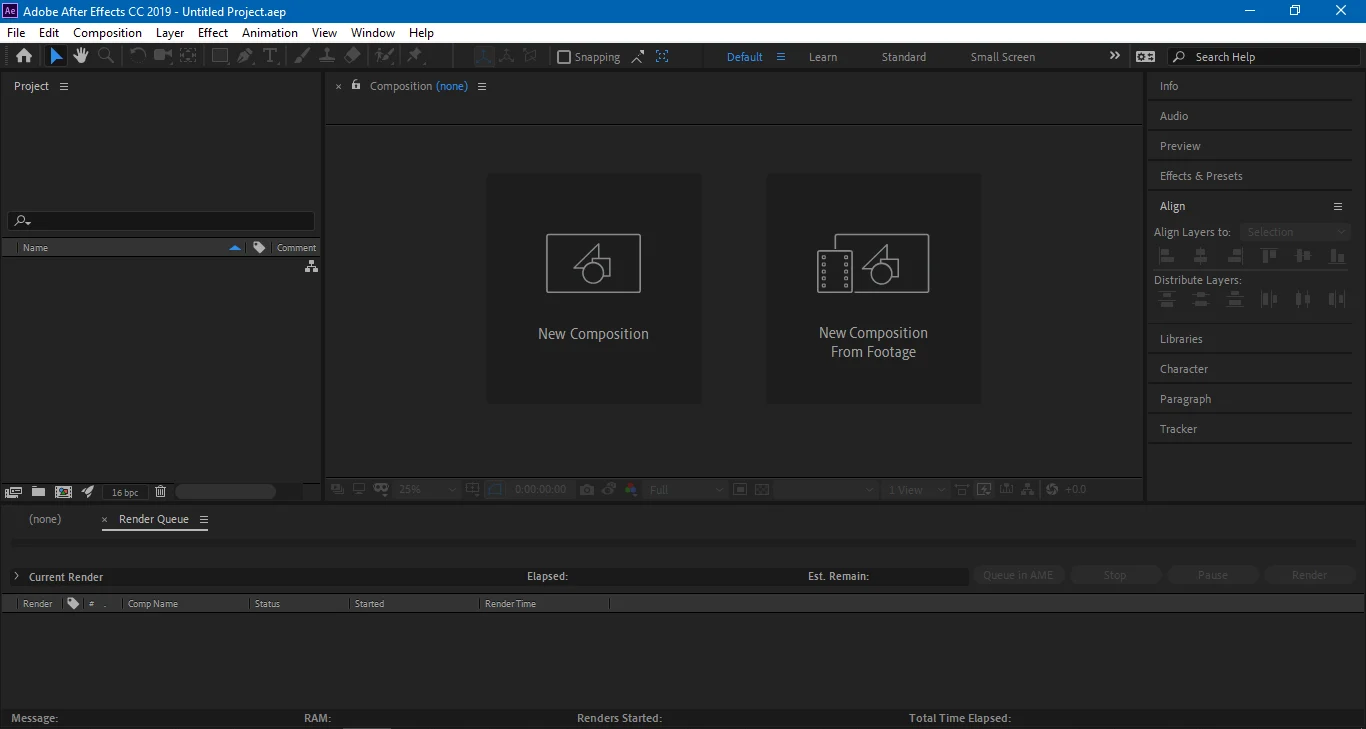
Pin LoopBoard above After Effects, Blender, Premiere or Photoshop, turn on click-through, and hide the interface. Your references float over your timeline while your cursor goes straight through to the app underneath. Play several clips at once and compare timing side by side.

After Effects running underneath LoopBoard pinned above an After Effects session at 60% opacity
ALWAYS ON TOPCLICK-THROUGHINTERFACE HIDDEN
BUILT TO HOLD UP
01

Hundreds of clips, one smooth canvas.

Boards stay responsive even with 200+ references playing.

02

Your work stays on your machine.

Boards live locally. No account, no uploads, no internet needed.

03

Hand off a whole board.

Export a .loopboard file and send it to anyone on your team.

Rayyan Burondkar
MADE BY A MOTION DESIGNER

LoopBoard is built by Rayyan Burondkar, a designer who needed it for his own showreel. Version 1.0 is out, and what gets built next comes from the people using it.

Start your next project on a board that moves.

Free to download. Nothing to sign up for.

Installs from the Microsoft Store

V1.0 · WINDOWS 10 / 11